Subtitle Genius – Real-time speech recognition and AI-based subtitle translation
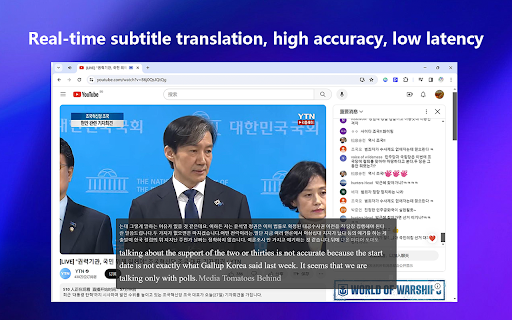
SubtitleGenius is an AI-based subtitle translation plugin that helps to overcome language barriers in learning and entertainment scenarios.
Introduction
Subtitle Genius – Real-time Speech Recognition and AI Subtitle Translation Overview
Subtitle Genius is an application that utilizes real-time speech recognition and AI translation technologies to provide users with convenient subtitle generation and translation services. It is capable of converting audio signals into text and automatically displaying bilingual subtitles, thereby significantly enhancing the efficiency and quality of cross-language communication.
Subtitle Genius – Real-time speech recognition and AI-based subtitle translation are its main features.
1. Real-time speech recognition: Subtitle Genius is capable of recognizing spoken content in real time and converting it into text.
2. AI Subtitle Translation: Utilizing advanced AI translation technologies, the recognized text is instantly translated into the target language, and subtitles are automatically generated as a result.
3. Bilingual subtitle display: Supports the simultaneous display of both the original text and the translated subtitles, facilitating users' comparison and understanding.
4. Subtitle Export and Editing: Users can export the generated subtitles in text format and also have the option to edit the subtitle content online.
Subtitle Genius – Real-time speech recognition and AI-based subtitle translation features
1. Multilingual support: Subtitle Genius enables translation between multiple languages, including English, Japanese, Korean, French, German, and other European, Asian languages, as well as regional languages or dialects such as Cantonese and Uyghur.
2. Floating window design: Subtitle Genius adopts a floating window design, which does not cover the video screen and ensures that the user’s viewing experience is not affected in any way.
3. High accuracy: Thanks to deep learning and advanced optimization algorithms, Subtitle Genius achieves high accuracy in speech recognition and translation, thereby reducing the occurrence of misrecognition or missed translations.
4. Wide applicability: Subtitle Genius is not only suitable for watching foreign films and TV shows or taking foreign language courses, but can also be used in business communication scenarios such as cross-language video conferences and telephone meetings.
Subtitle Genius – Real-time speech recognition and AI-based subtitle translation services, suitable for a wide range of users.
1. Fans of foreign films and TV shows: Subtitle Genius can help them translate the subtitles of these works in real-time, thereby enhancing their viewing experience.
2. Foreign language learners: Subtitle Magic can serve as an auxiliary learning tool, helping them better understand content in foreign languages.
3. Cross-language communicators: Such as business professionals and international students, Subtitle Genius can provide real-time translations for meetings, courses, and other types of content, thereby enhancing the efficiency of communication.
Subtitle Genius – Common Issues Regarding Real-Time Speech Recognition and AI-Driven Subtitle Translation Services
1. Inaccurate speech recognition: In noisy environments, the accuracy of speech recognition-based subtitles may decrease. Possible solutions include enhancing the algorithm’s ability to suppress noise or using multiple microphones to capture sound.
2. Difficulty in recognizing dialects and accents: Current speech recognition and subtitle generation technologies are primarily designed to work with standard Mandarin, and their ability to recognize dialects and accents is limited. In the future, unsupervised learning may become an important technique for improving the accuracy of such systems.
3. Timeline synchronization issue: If the timeline of the subtitles does not match that of the video, it can affect the viewing experience. This may be due to delays in speech recognition or translation processes. Users can try adjusting the settings of the subtitle tool or updating the software version to resolve this problem.
4. Restrictions on subtitle export formats: Subtitle Genius may only support the export of subtitles in specific formats. If users require subtitle files in other formats, they may need to use additional tools for conversion.
In summary, Subtitle Genius is a powerful and versatile tool for real-time speech recognition and AI-based subtitle translation, offering users convenient and accurate cross-language communication services. During use, users may encounter some common issues, but most of them can be resolved by adjusting settings or updating the software version.